Jump to content
View in the app

A better way to browse. Learn more.

Moestuin Forum

A full-screen app on your home screen with push notifications, badges and more.

To install this app on iOS and iPadOS
  1. Tap the Share icon in Safari
  2. Scroll the menu and tap Add to Home Screen.
  3. Tap Add in the top-right corner.
To install this app on Android
  1. Tap the 3-dot menu (⋮) in the top-right corner of the browser.
  2. Tap Add to Home screen or Install app.
  3. Confirm by tapping Install.

Hé psssssst, kennen jullie me nog.... zo zag ik er vorig jaar uit als babyplantje Asperge Violette:
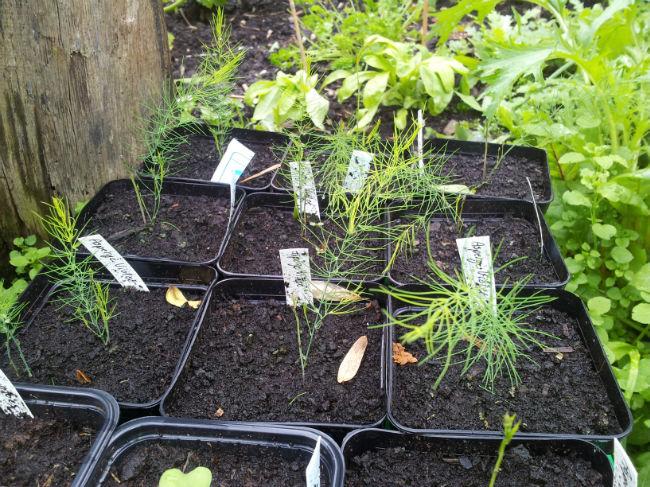
2014-05-12-1518451428244299.24


En nu, jaar 2, al een beetje als een echte paarse asperge!
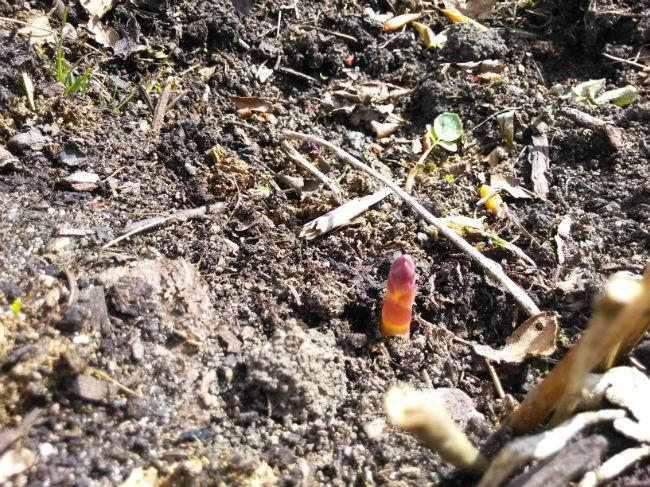
2015-04-05-1454061428244237.27


Het schijnt dat je ze pas in het derde jaar mag oogsten, maar ik denk dat ik er stiekem een paar ga proberen


De pepers en paprika's gaan goed, dankzij alle tips hier. Begin februari gezaaid en onder een tl lampje met timer gezet. Nu moeten ze het maar eventjes redden in de vensterbank tot ze naar de kas mogen...
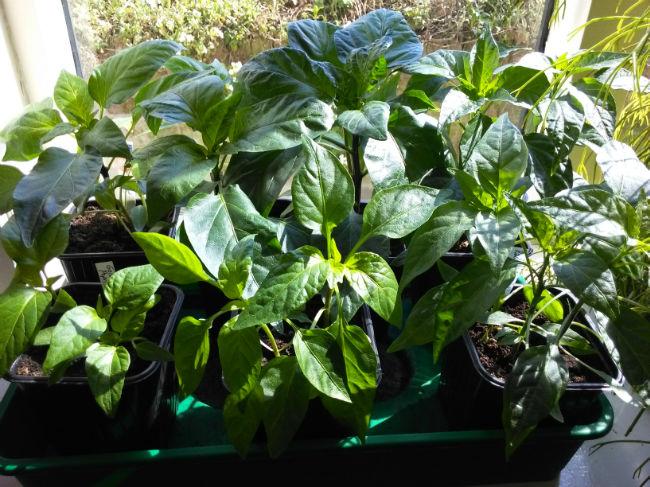
2015-04-05-1373371428244344.38

1 Comment

Recommended Comments

jootje

Members

Oohh....gaaf...die paarse asperge! Morgen naar de tuin, kijken of ze bij mij hun kopjes al boven de grond uitsteken! ( groene)

Guest
Add a comment...

Configure browser push notifications

Chrome (Android)
  1. Tap the lock icon next to the address bar.
  2. Tap Permissions → Notifications.
  3. Adjust your preference.
Chrome (Desktop)
  1. Click the padlock icon in the address bar.
  2. Select Site settings.
  3. Find Notifications and adjust your preference.