


Jump to content
View in the app

A better way to browse. Learn more.

Moestuin Forum

A full-screen app on your home screen with push notifications, badges and more.

To install this app on iOS and iPadOS
  1. Tap the Share icon in Safari
  2. Scroll the menu and tap Add to Home Screen.
  3. Tap Add in the top-right corner.
To install this app on Android
  1. Tap the 3-dot menu (⋮) in the top-right corner of the browser.
  2. Tap Add to Home screen or Install app.
  3. Confirm by tapping Install.

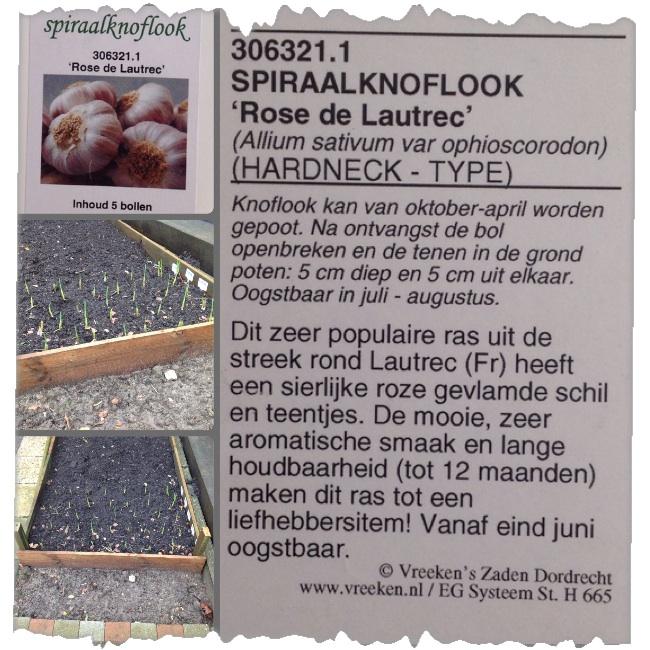
Even de tuin in gelopen om foto's te maken van de knoflook.

Dit is een van de verhoogde bakken die ik dit seizoen voor het eerst uit ga proberen.

Achter de knoflook wil ik sjalotten plaatsen.

Voor de bak heb ik ruimte over gelaten, de bedoeling is dat hier kruiden komen te staan maar waarschijnlijk word het goudsbloem (Calendula)image40641390304926.jpg
0 Comments

Recommended Comments

There are no comments to display.

Guest
Add a comment...

Configure browser push notifications

Chrome (Android)
  1. Tap the lock icon next to the address bar.
  2. Tap Permissions → Notifications.
  3. Adjust your preference.
Chrome (Desktop)
  1. Click the padlock icon in the address bar.
  2. Select Site settings.
  3. Find Notifications and adjust your preference.