Jump to content
View in the app

A better way to browse. Learn more.

Moestuin Forum

A full-screen app on your home screen with push notifications, badges and more.

To install this app on iOS and iPadOS
  1. Tap the Share icon in Safari
  2. Scroll the menu and tap Add to Home Screen.
  3. Tap Add in the top-right corner.
To install this app on Android
  1. Tap the 3-dot menu (⋮) in the top-right corner of the browser.
  2. Tap Add to Home screen or Install app.
  3. Confirm by tapping Install.

Gister zijn mijn bestelde zaden binnen gekomen en de zadenenvelop, dubbel feest dus . Ik ben gister dus lekker de hele dag (na school) bezig geweest met zaden uitzoeken en alvast kijken wat ik komend seizoen wil gaan zaaien.


DSCF205986741392408203.JPG


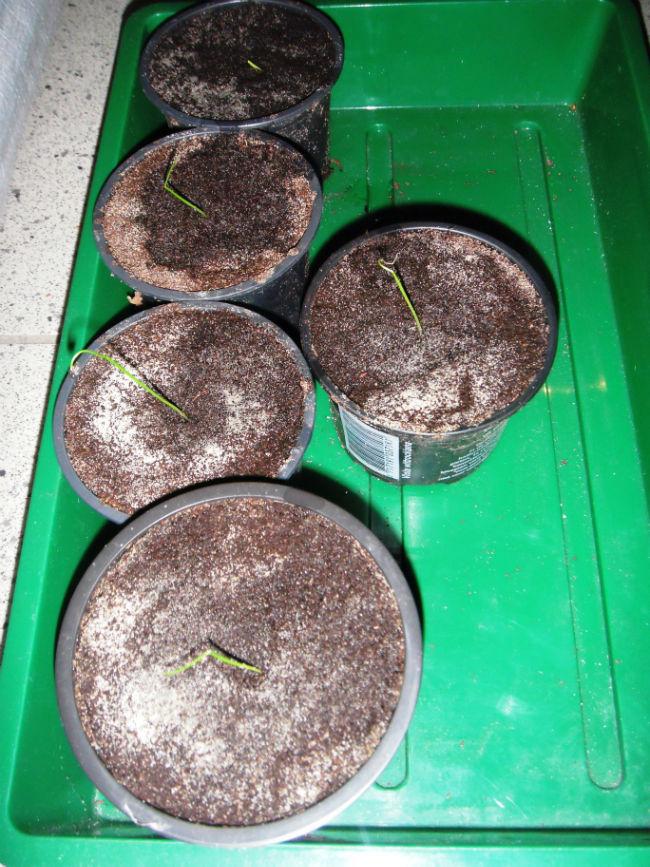
Van de "Mammoth Pot" wedstrijd zaden zijn er nu 5 van de 15 boven, ik verwacht nog een 6de.


DSCF205557491392408196.JPG


DSCF206723731392408219.JPG


DSCF207031551392408231.JPG

1 Comment

Recommended Comments

Dirk0229

Members

Succes, ik ga het volgen.

Guest
Add a comment...

Configure browser push notifications

Chrome (Android)
  1. Tap the lock icon next to the address bar.
  2. Tap Permissions → Notifications.
  3. Adjust your preference.
Chrome (Desktop)
  1. Click the padlock icon in the address bar.
  2. Select Site settings.
  3. Find Notifications and adjust your preference.