


Jump to content
View in the app

A better way to browse. Learn more.

Moestuin Forum

A full-screen app on your home screen with push notifications, badges and more.

To install this app on iOS and iPadOS
  1. Tap the Share icon in Safari
  2. Scroll the menu and tap Add to Home Screen.
  3. Tap Add in the top-right corner.
To install this app on Android
  1. Tap the 3-dot menu (⋮) in the top-right corner of the browser.
  2. Tap Add to Home screen or Install app.
  3. Confirm by tapping Install.

Maandag 11 juni 2012 ben ik begonnen met het werken aan een eigen moestuin. Sindsdien heb ik de werkzaamheden op mijn blog al bijgehouden.

Vanaf nu zal ik echter ook dit topic bijhouden met tekst en foto's.


Zoals jullie al hebben kunnen lezen in mijn 'ik ben nieuw en stel me even voor'-topic ben ik volgens de principes van de film "Back to Eden" begonnen. Dat wil zeggen dat ik kranten heb neergelegd, gevolgd door een laag potgrond/compost met daarop houtsnippers. Nu heb ik de houtsnippers nog niet kunnen halen, vandaar dat ik het dit jaar doe met boomschors.
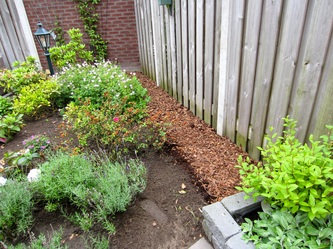
 

2720659.jpg

Moestuin overzicht 11 juni

1 Comment

Recommended Comments

EdenMoestuin

Members

Gereserveerd voor update woensdag 20 juni. Wordt aan gewerkt.

Guest
Add a comment...

Configure browser push notifications

Chrome (Android)
  1. Tap the lock icon next to the address bar.
  2. Tap Permissions → Notifications.
  3. Adjust your preference.
Chrome (Desktop)
  1. Click the padlock icon in the address bar.
  2. Select Site settings.
  3. Find Notifications and adjust your preference.
