Jump to content
View in the app

A better way to browse. Learn more.

Moestuin Forum

A full-screen app on your home screen with push notifications, badges and more.

To install this app on iOS and iPadOS
  1. Tap the Share icon in Safari
  2. Scroll the menu and tap Add to Home Screen.
  3. Tap Add in the top-right corner.
To install this app on Android
  1. Tap the 3-dot menu (⋮) in the top-right corner of the browser.
  2. Tap Add to Home screen or Install app.
  3. Confirm by tapping Install.

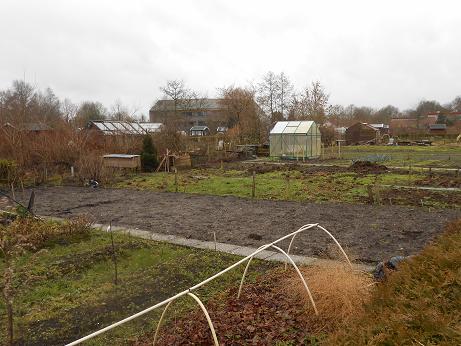
Sinds kort een echt volkstuintje. Bijgaand een fotootje. Die "zwarte rechthoek" in het midden is voor mij. Kortom genoeg te doen . Het is ca. 75 m2 op een groot tuincomplex.

DSCN001173171392105000.png

Het kleine moestuintje in de achtertuin blijf ik gebruiken, maar wat precies waar komt ben ik nog aan het uitvogelen.


1 Comment

Recommended Comments

Bit

Members

Feli feli ! Een leuke lap grond ! Is het ver van je huis vandaan ? Kan je ergens heen, als er es een half uurtje regen valt ? Hebben ze van de vereniging uit alles voor je omgelegd ?


Als je stekken van iets moet ? Of ga je alles van nul af aan opbouwen ?

Veel vragen, sorry

Guest
Add a comment...

Configure browser push notifications

Chrome (Android)
  1. Tap the lock icon next to the address bar.
  2. Tap Permissions → Notifications.
  3. Adjust your preference.
Chrome (Desktop)
  1. Click the padlock icon in the address bar.
  2. Select Site settings.
  3. Find Notifications and adjust your preference.