


Jump to content
View in the app

A better way to browse. Learn more.

Moestuin Forum

A full-screen app on your home screen with push notifications, badges and more.

To install this app on iOS and iPadOS
  1. Tap the Share icon in Safari
  2. Scroll the menu and tap Add to Home Screen.
  3. Tap Add in the top-right corner.
To install this app on Android
  1. Tap the 3-dot menu (⋮) in the top-right corner of the browser.
  2. Tap Add to Home screen or Install app.
  3. Confirm by tapping Install.

Ondertussen druk bezig geweest met het plannen van de moestuin. Niet alleen omdat ik sta te springen om eraan te beginnen maar ook omdat we dit weekend gaan mesten. Aangezien ik rekening wil houden met de mestbehoefte van de groenten moet ik al min of meer weten waar alles zal komen.
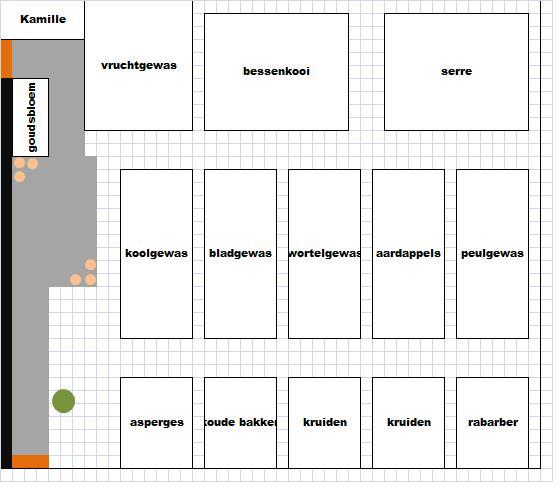
 

planning-moestuin-201284881352233490.jpg


Mochten jullie bedenkingen of advies hebben... Shoot!

1 Comment

Recommended Comments

Thessa

Members

(edited)

wat heb jij het leuk voor elkaar !! heb de andere berichten ook even door gelezen maar je bent goed opweg zeg

ben benieuwd naar komende foto's en verhaaldjes.

Edited by Jorieke123

Guest
Add a comment...

Configure browser push notifications

Chrome (Android)
  1. Tap the lock icon next to the address bar.
  2. Tap Permissions → Notifications.
  3. Adjust your preference.
Chrome (Desktop)
  1. Click the padlock icon in the address bar.
  2. Select Site settings.
  3. Find Notifications and adjust your preference.