


Jump to content
View in the app

A better way to browse. Learn more.

Moestuin Forum

A full-screen app on your home screen with push notifications, badges and more.

To install this app on iOS and iPadOS
  1. Tap the Share icon in Safari
  2. Scroll the menu and tap Add to Home Screen.
  3. Tap Add in the top-right corner.
To install this app on Android
  1. Tap the 3-dot menu (⋮) in the top-right corner of the browser.
  2. Tap Add to Home screen or Install app.
  3. Confirm by tapping Install.

Deze nieuwe bezoeker had ik nog niet gezien...Dheuuu...is meestal bij nieuwe bezoekers hé

Een of andere zwarte bijensoort.
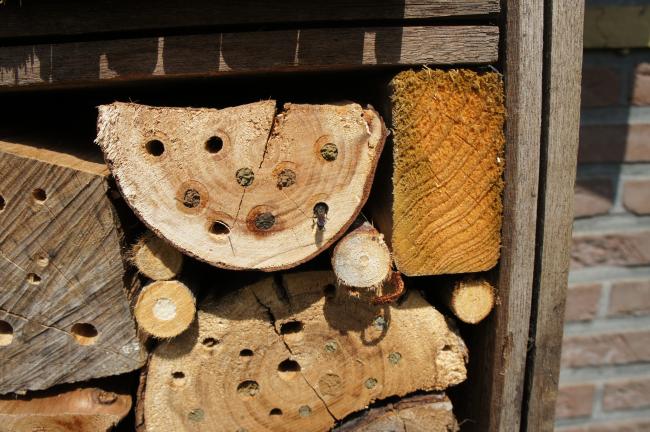
 

controlebox-bijenhotel-00391191339064185.JPG


Mijn eerste controlebox kreeg maar geen bezoek en heb de transparante flexibel buis vervangen door kleinere glazen labopipetjes....met succes!

Je ziet zo mooi de opbouw van nectar, het eitje en de afsluitschacht van modder.
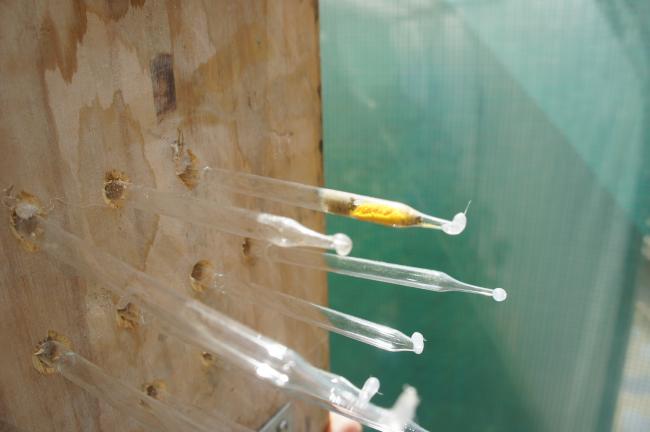
controlebox-bijenhotel-00743711339064405.JPG

2 Comments

Recommended Comments

Helly

Members

Mooi

Apart dat de slangetjes niet aansloegen en de pipetjes wel. Komt dat misschien omdat de slangetjes teveel bewegingen maakten?

Rantje

Members

Wat onwijs leuk weer Sky

Er ligt al een stuk hout hier, de rest van m'n bouwsel is een beetje mislukt en de boormachine doet het ook niet zo best meer, nou ja het boortje zelf...

Guest
Add a comment...

Configure browser push notifications

Chrome (Android)
  1. Tap the lock icon next to the address bar.
  2. Tap Permissions → Notifications.
  3. Adjust your preference.
Chrome (Desktop)
  1. Click the padlock icon in the address bar.
  2. Select Site settings.
  3. Find Notifications and adjust your preference.